 e30ae8ed09
- App.tsx: full navigation (Auth stack + Main tabs with 5 screens)
- Auth: LoginScreen, RegisterScreen, ForgotPasswordScreen
- HomeScreen: dashboard with IoT metrics, weather widget, alerts, quick actions, sensors
- MapScreen: interactive map with layer toggles (6 layers)
- MarketplaceScreen: categories (6), products (5), search
- ChatScreen: AI chat with quick prompts (4), bot responses
- ProfileScreen: user info, stats, menu (9 items), logout
- AlertsScreen: alert list with severity, acknowledge
- SensorsScreen: sensor list with type filters (6 types), search
- ZonesScreen: zone cards with stats
- SettingsScreen: language picker (FR/EN/ES/DE), privacy, about
- Stores: iotStore (sensors, zones, alerts), notificationStore, uiStore + i18n
- Hooks: useSensors, useAlerts, useNotifications, useLocation
- Components: Card, Button, LoadingSpinner, ErrorBoundary, Header
- Services: iotService, notificationService (with axios API client)
- Utils: formatters (temp, AQI, noise, dates), validators (email, password, IBAN)
- Theme: colors.ts with full design system (Blue Ocean palette)
- Ditto: fixed MongoDB connection, new JWT secrets, official gateway image
88 lines
4.1 KiB
Markdown
88 lines
4.1 KiB
Markdown
# Hermes Profile Transformer
|
|
|
|
<p align="center">
|
|
<img alt="npm" src="https://img.shields.io/npm/v/hermes-profile-transformer">
|
|
<img alt="node-current" src="https://img.shields.io/node/v/hermes-profile-transformer">
|
|
<img alt="npm bundle size" src="https://img.shields.io/bundlephobia/min/hermes-profile-transformer">
|
|
<img alt="NPM" src="https://img.shields.io/npm/l/hermes-profile-transformer">
|
|
<img alt="npm type definitions" src="https://img.shields.io/npm/types/hermes-profile-transformer">
|
|
</p>
|
|
|
|
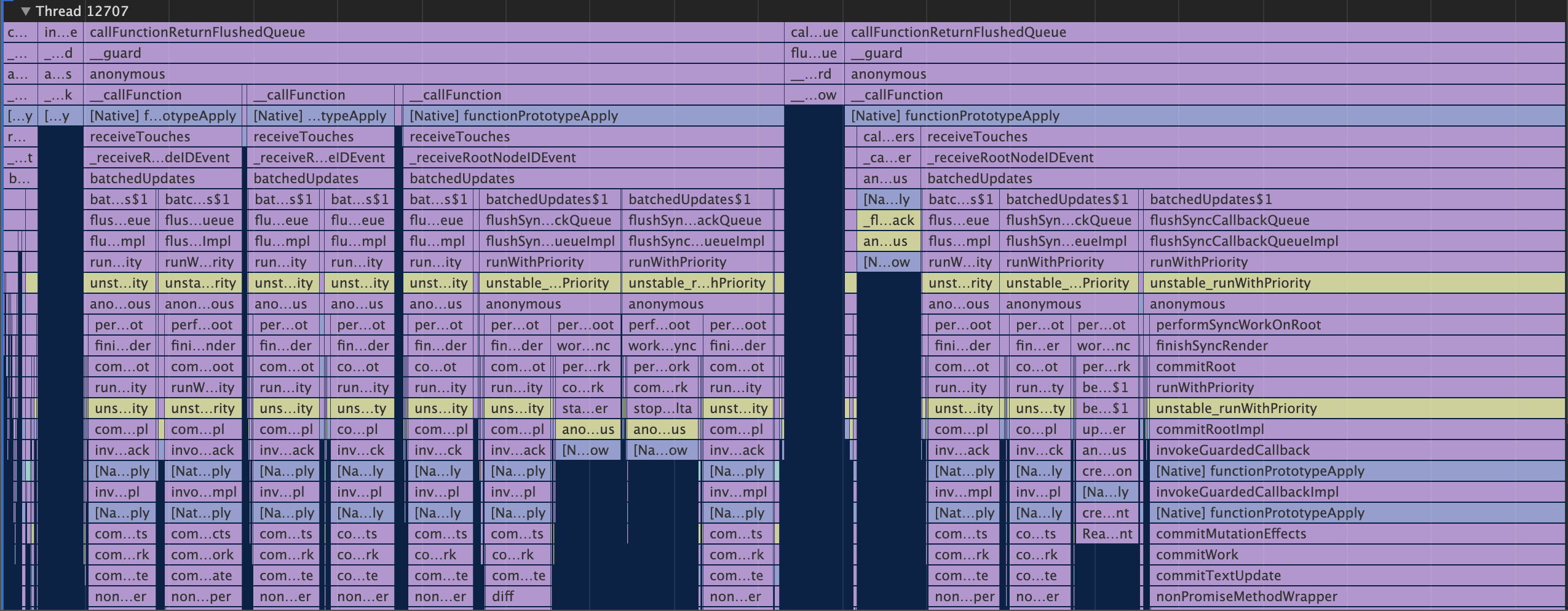
Visualize Facebook's [Hermes JavaScript runtime](https://github.com/facebook/hermes) profile traces in Chrome Developer Tools.
|
|
|
|
|
|
|
|
## Overview
|
|
|
|
The Hermes runtime, used by React Native for Android, is able to output [Chrome Trace Events](https://docs.google.com/document/d/1CvAClvFfyA5R-PhYUmn5OOQtYMH4h6I0nSsKchNAySU/preview) in JSON Object Format.
|
|
|
|
This TypeScript package converts Hermes CPU profiles to Chrome Developer Tools compatible JSON Array Format, and enriches it with line and column numbers and event categories from JavaScript source maps.
|
|
|
|
## Usage
|
|
|
|
If you're using `hermes-profile-transformer` to debug React Native Android applications, you can use the [React Native CLI](https://github.com/react-native-community/cli) `react-native profile-hermes` command, which uses this package to convert the downloaded Hermes profiles automatically.
|
|
|
|
### As a standalone package
|
|
|
|
```js
|
|
const transformer = require('hermes-profile-transformer').default;
|
|
const { promises } = require('fs');
|
|
|
|
const hermesCpuProfilePath = './testprofile.cpuprofile';
|
|
const sourceMapPath = './index.map';
|
|
const sourceMapBundleFileName = 'index.bundle.js';
|
|
|
|
transformer(
|
|
// profile path is required
|
|
hermesCpuProfilePath,
|
|
// source maps are optional
|
|
sourceMap,
|
|
sourceMapBundleFileName
|
|
)
|
|
.then(events => {
|
|
// write converted trace to a file
|
|
return promises.writeFile(
|
|
'./chrome-supported.json',
|
|
JSON.stringify(events, null, 2),
|
|
'utf-8'
|
|
);
|
|
})
|
|
.catch(err => {
|
|
console.log(err);
|
|
});
|
|
```
|
|
|
|
## Creating Hermes CPU Profiles
|
|
|
|
## Opening converted profiles in Chrome Developer Tools
|
|
|
|
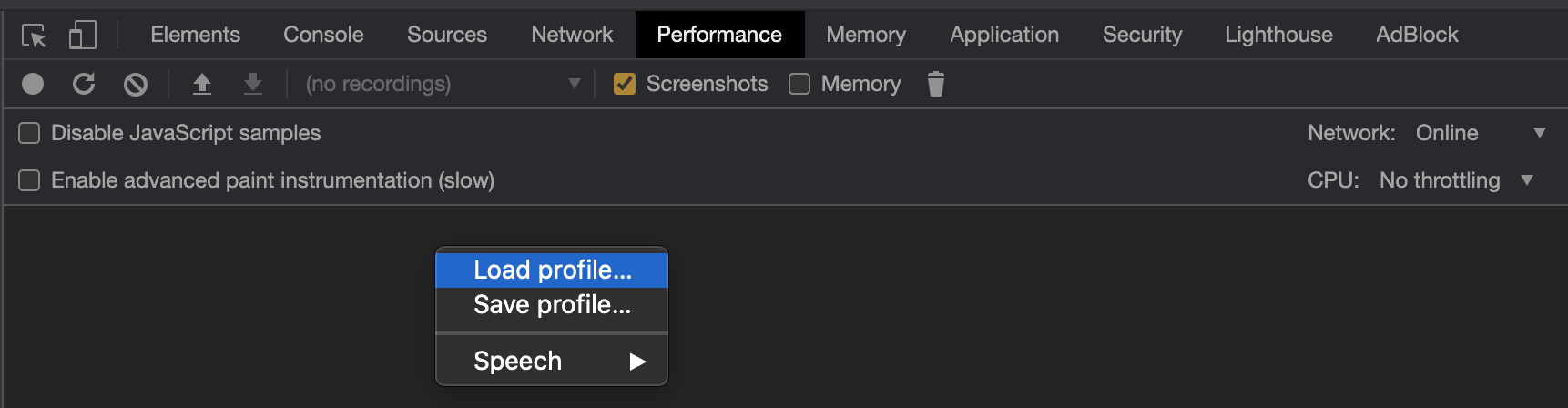
Open Developer Tools in Chrome, navigate to the **Performance** tab, and use the **Load profile...** feature.
|
|
|
|
|
|
|
|
## API
|
|
|
|
### transformer(profilePath: string, sourceMapPath?: string, bundleFileName?: string)
|
|
|
|
#### Parameters
|
|
|
|
| Parameter | Type | Required | Description |
|
|
| -------------- | ------ | -------- | ------------------------------------------------------------------------------------------------------------------------------------------------------------------------- |
|
|
| profilePath | string | Yes | Path to a JSON-formatted `.cpuprofile` file created by the Hermes runtime |
|
|
| sourceMapPath | string | No | Path to a [source-map](https://www.npmjs.com/package/source-map) compatible Source Map file |
|
|
| bundleFileName | string | No | If `sourceMapPath` is provided, you need to also provide the name of the JavaScript bundle file that the source map applies to. This file does not need to exist on disk. |
|
|
|
|
#### Returns
|
|
|
|
`Promise<DurationEvent[]>`, where `DurationEvent` is as defined in [EventInterfaces.ts](src/types/EventInterfaces.ts).
|
|
|
|
## Resources
|
|
|
|
- [Using Hermes with React Native](https://reactnative.dev/docs/hermes).
|
|
- [Chrome Trace Event Format](https://docs.google.com/document/d/1CvAClvFfyA5R-PhYUmn5OOQtYMH4h6I0nSsKchNAySU/preview). Hermes uses the JSON Object format.
|
|
- [Measuring JavaScript performance in Chrome](https://developers.google.com/web/tools/chrome-devtools/evaluate-performance/reference)
|
|
|
|
## LICENSE
|
|
|
|
[MIT](LICENSE)
|