 e30ae8ed09
- App.tsx: full navigation (Auth stack + Main tabs with 5 screens)
- Auth: LoginScreen, RegisterScreen, ForgotPasswordScreen
- HomeScreen: dashboard with IoT metrics, weather widget, alerts, quick actions, sensors
- MapScreen: interactive map with layer toggles (6 layers)
- MarketplaceScreen: categories (6), products (5), search
- ChatScreen: AI chat with quick prompts (4), bot responses
- ProfileScreen: user info, stats, menu (9 items), logout
- AlertsScreen: alert list with severity, acknowledge
- SensorsScreen: sensor list with type filters (6 types), search
- ZonesScreen: zone cards with stats
- SettingsScreen: language picker (FR/EN/ES/DE), privacy, about
- Stores: iotStore (sensors, zones, alerts), notificationStore, uiStore + i18n
- Hooks: useSensors, useAlerts, useNotifications, useLocation
- Components: Card, Button, LoadingSpinner, ErrorBoundary, Header
- Services: iotService, notificationService (with axios API client)
- Utils: formatters (temp, AQI, noise, dates), validators (email, password, IBAN)
- Theme: colors.ts with full design system (Blue Ocean palette)
- Ditto: fixed MongoDB connection, new JWT secrets, official gateway image
isarray
Array#isArray for older browsers and deprecated Node.js versions.


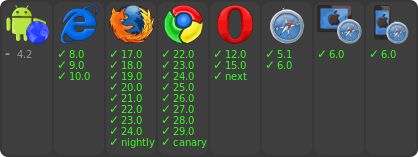
Just use Array.isArray directly, unless you need to support those older versions.
Usage
var isArray = require('isarray');

console.log(isArray([])); // => true
console.log(isArray({})); // => false
Installation
With npm do
$ npm install isarray
Then bundle for the browser with browserify.
Sponsors
This module is proudly supported by my Sponsors!
Do you want to support modules like this to improve their quality, stability and weigh in on new features? Then please consider donating to my Patreon. Not sure how much of my modules you're using? Try feross/thanks!