# BAP and BPP registration with Registry
After updating your DNS records, you need to register the `bap-network` and `bpp-network` services with the registry service. Follow these instructions to complete the registration process:
## 1. Register BAP or BPP Network
### Formulate the Registration Payload
Use the table below to create the JSON payload for registering the `bap-network` or `bpp-network`:
| Field | Description | Example Value |
|----------------------|---------------------------------------------------------------|-------------------------------------------------------------|
| `subscriber_id` | Set this to the DNS name of the `bap-network` or `bpp-network`. | `bap-network.beckn-onix-aws-cdk.becknprotocol.io` or `bpp-network.beckn-onix-aws-cdk.becknprotocol.io` |
| `pub_key_id` | Public key that the BAP/BPP service started with. | |
| `unique_key_id` | Unique key identifier, usually in the format `subscriber_id.k1`. | `bap-network.beckn-onix-aws-cdk.becknprotocol.io.k1` or `bpp-network.beckn-onix-aws-cdk.becknprotocol.io.k1` |
| `subscriber_url` | URL of the `bap-network` or `bpp-network`. | `https://bap-network.beckn-onix-aws-cdk.becknprotocol.io` or `https://bpp-network.beckn-onix-aws-cdk.becknprotocol.io` |
| `domain` | Leave this as an empty string if not used. Or check if a domain has been configured on Registry. | ` ` |
| `extended_attributes`| Additional attributes if any. | `{"domains": []}` |
| `encr_public_key` | Encryption public key that the BAP/BPP service uses. This is same as `pub_key_id` | |
| `signing_public_key` | Signing public key that the BAP/BPP service uses. This is same as `pub_key_id` | |
| `valid_from` | Start date and time in ISO 8601 format. | `2024-09-05T09:27:57.630Z` |
| `valid_until` | Expiration date and time in ISO 8601 format. | `2027-09-06T09:28:40.494Z` |
| `type` | Set to `BAP` or `BPP` based on the service. | `BAP` or `BPP` |
| `country` | Country code. | `IND` |
| `status` | Use `SUBSCRIBED` to indicate that the registration is complete. | `SUBSCRIBED` |
**Example `curl` Command for BAP Network:**
```bash
curl --location --request POST 'https://registry.beckn-onix-aws-cdk.becknprotocol.io/subscribers/register' \
--header "Content-Type: application/json" \
--data-raw '{
"subscriber_id": "subscriber_id",
"pub_key_id": "public_key",
"unique_key_id": "subscriber_id.k1",
"subscriber_url": "https://url_bap_network",
"domain": " ",
"extended_attributes": {"domains": []},
"encr_public_key": "public_key",
"signing_public_key": "public_key",
"valid_from": "2024-09-05T09:27:57.630Z",
"valid_until": "2027-09-06T09:28:40.494Z",
"type": "BAP",
"country": "IND",
"status": "SUBSCRIBED"
}'
```
**Example `curl` Command for BPP Network:**
```bash
curl --location --request POST 'https://registry.beckn-onix-aws-cdk.becknprotocol.io/subscribers/register' \
--header "Content-Type: application/json" \
--data-raw '{
"subscriber_id": "subscriber_id",
"pub_key_id": "public_key",
"unique_key_id": "subscriber_id.k1",
"subscriber_url": "https://url-bpp-network",
"domain": " ",
"extended_attributes": {"domains": []},
"encr_public_key": "public_key",
"signing_public_key": "public_key",
"valid_from": "2024-09-05T09:27:57.630Z",
"valid_until": "2027-09-06T09:28:40.494Z",
"type": "BPP",
"country": "IND",
"status": "SUBSCRIBED"
}'
```
### Update Status in Registry UI
After sending the registration request, you need to manually update the status in the registry service UI. The auto-registration feature of BAP and BPP with Registry is in the backlog. Follow these steps:
1. **Login into the Registry**
Navigate to the **Admin** section, and click on **Network Participant**.
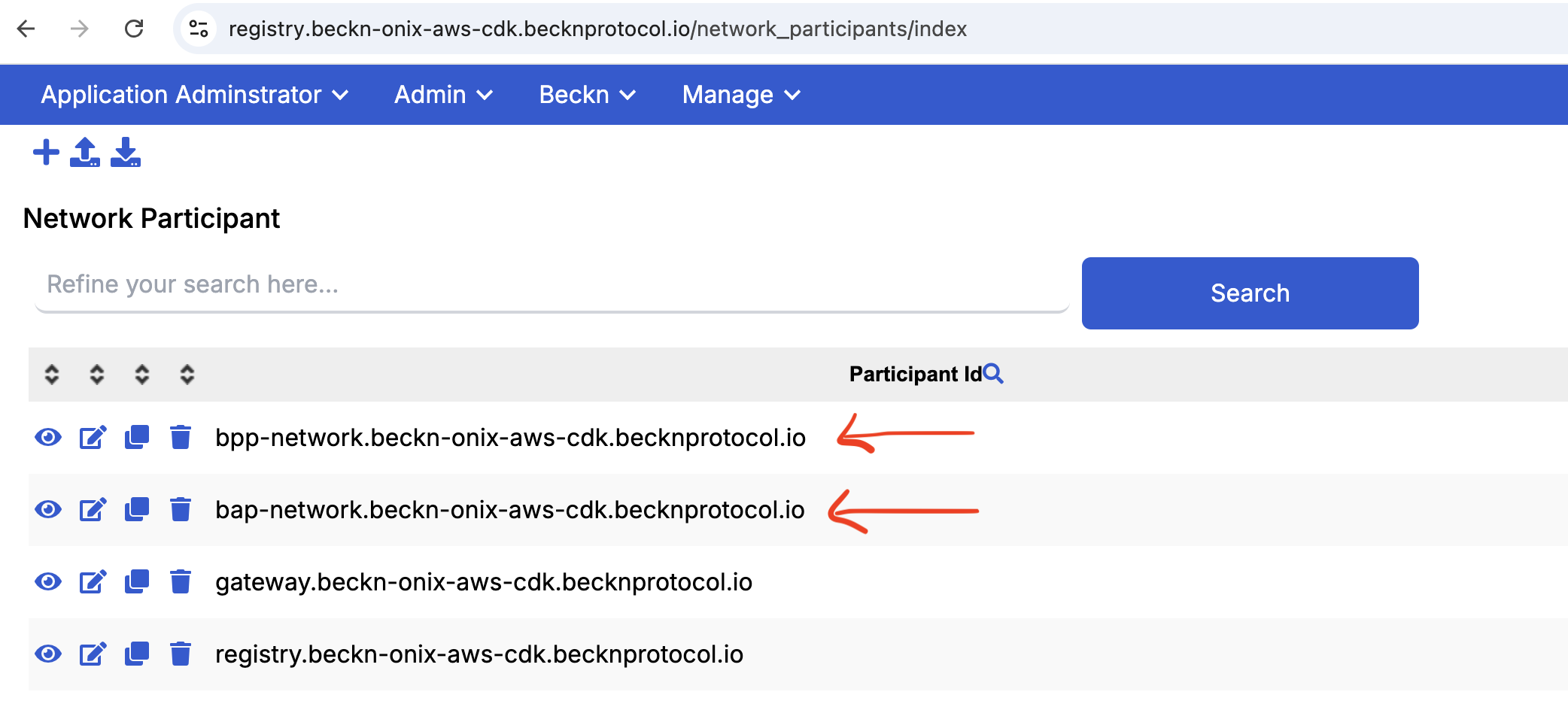 2. **Open BAP or BPP Participant**
Find and select the **BAP** or **BPP** participant you registered earlier.
2. **Open BAP or BPP Participant**
Find and select the **BAP** or **BPP** participant you registered earlier.
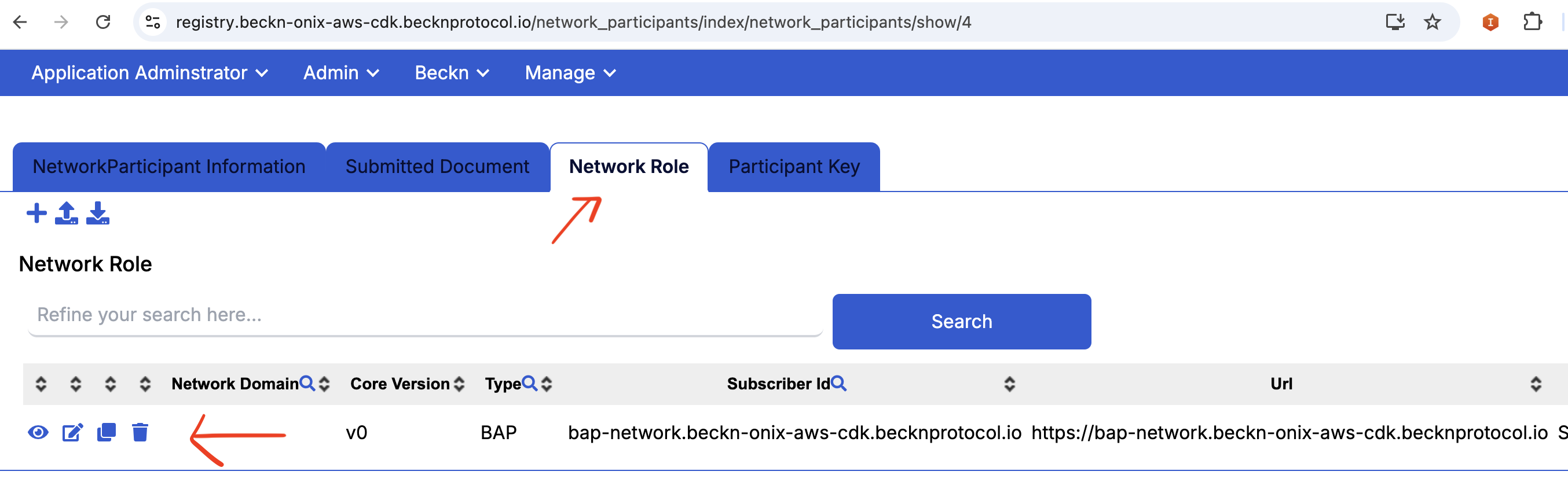 3. **Navigate to Network Role Tab and Edit**
Go to the **Network Role** tab and click **Edit**.
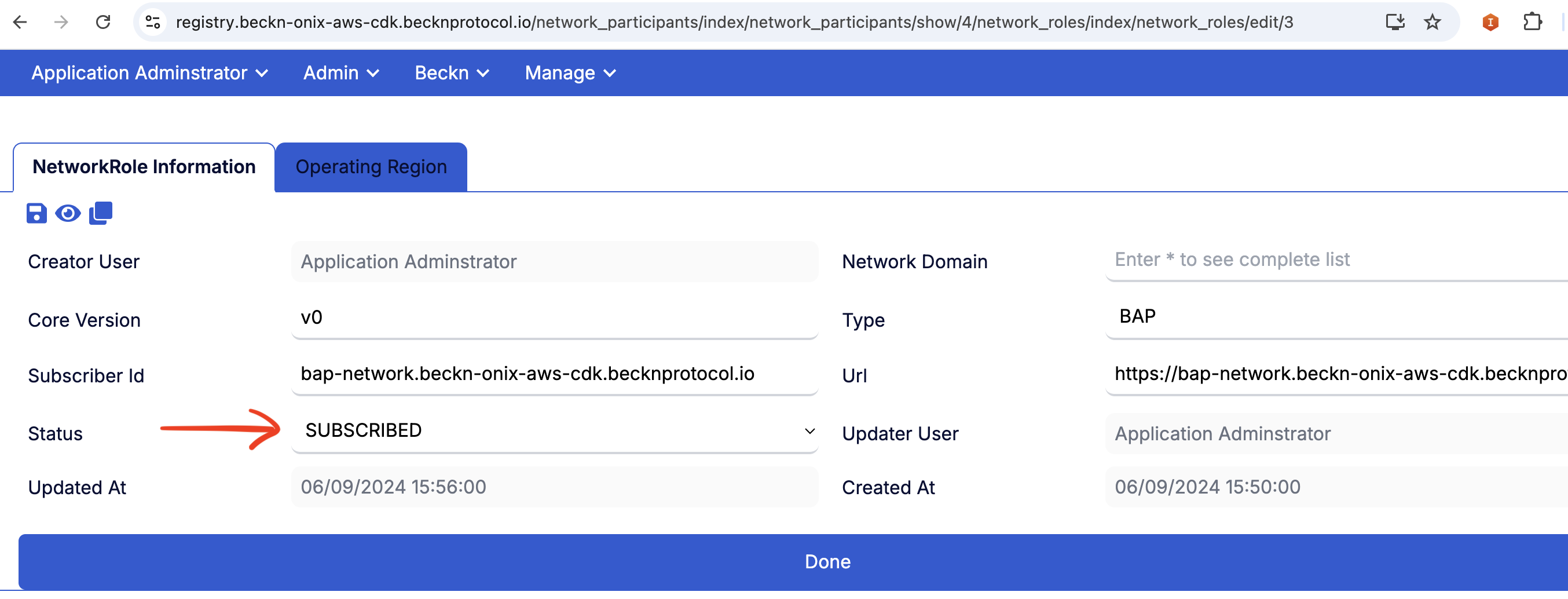
4. **Edit Status and Select SUBSCRIBE**
Update the status from `INITIATED` to `SUBSCRIBED`, then save your changes.
3. **Navigate to Network Role Tab and Edit**
Go to the **Network Role** tab and click **Edit**.
4. **Edit Status and Select SUBSCRIBE**
Update the status from `INITIATED` to `SUBSCRIBED`, then save your changes.